Case study · 2026
DreamApp
A dream journal that helps track and make sense of your dream. User can log a dream, where it gives a fun interpretation and asynchronousely generate an image associated to that dream. Has a chat feature to dig deeper into what that dream means.
Summary
This was a really fun 5-day project with my team! Also marks my first time deploying a real app to cloud (Heroku). DreamApp lets you log a dream, then uses an LLM to give it a title, an interpretation, and a set of themes and symbols. A fun image of the dream is generated in the background and pushed to the page over Turbo Streams, and a chat lets you ask follow-up questions about what it means.
Key new concepts I learned building it:
- Authentication with Devise, including Google OAuth2 sign-in through OmniAuth
- Background jobs with Solid Queue, to take slow image generation out of the request cycle
- Real-time updates with Turbo Streams over Action Cable (Solid Cable), so the image appears the moment it’s ready
- LLM integration with RubyLLM: structured output with a RubyLLM schema, image generation, and a multi-turn chat
Target user
Anyone who keeps on forgetting their dreams, and wants to keep a dream journal and get a reflection on what a dream might mean!
The problem
“I forget my dreams” Sometimes we have a dream that we want to remember, but we often forget about them. Now, we can track!
“I have the same dream 3 times in a row. What does my dream mean?” 3 nightmares in a row could mean something is affecting our mental. It’s best to have interpretation of those before it’s too late!
Features
- Easy sign-in
- Sign in with Google in one click, or use an email and password.
- Dream interpretation
- Describe your dream and how it felt. The AI gives it a title, a short interpretation, and the main themes and symbols.
- Dream illustrations
- Each dream gets its own surreal illustration, generated in the background from its themes, symbols, and mood.
- Fun loading messages
- While the image is being painted, the page shows messages like “Consulting a sleep-deprived magician…”. The image appears as soon as it’s ready, with no refresh.
- Dream journal
- Your dreams are listed by date. Themes and symbols become tags, so you can click one to find every dream that has it.
- Ask follow-up questions
- Each dream has its own chat, so you can ask what a specific detail might mean.


Database design
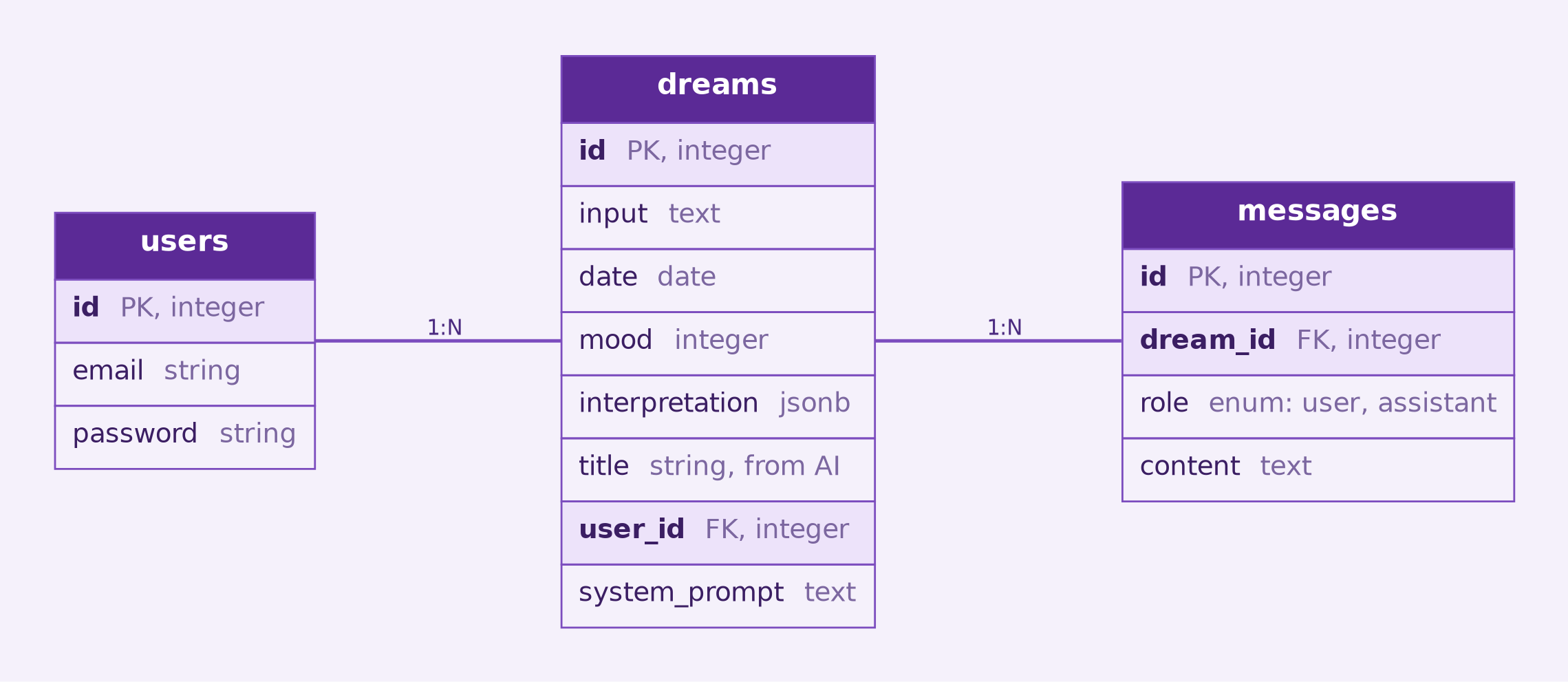
Key points:
- A user has many dreams, and each dream has many messages. Messages hold the follow-up chat, and each one’s
roleisuserorassistant. - A dream stores what the user wrote (
inputandmood) and what the AI returned. Thetitlehas its own column. The summary, themes, and symbols are stored together in aninterpretationJSONB column and read throughstore_accessor. - The generated image is attached to the dream with Active Storage and stored on Cloudinary.
- Themes and symbols are also saved as tags with acts-as-taggable-on, in the
tagsandtaggingstables. This is what makes the filter-by-tag links work.
Technical challenges
Google OAuth2 with Devise
Google sign-in uses omniauth-google-oauth2 with Devise’s :omniauthable module, next to the usual email and password login.

-
The user clicks “Easy Login with Google.” The button sends a POST request, protected by
omniauth-rails_csrf_protection, with Turbo turned off so the browser can follow the redirect. This starts the OAuth2 authorization code flow and sends the user to Google’s consent screen. -
Google redirects back with a code. OmniAuth exchanges the code for an access token and fetches the user’s Google profile.
-
Users::OmniauthCallbacksControllerhandles the callback.User.from_omniauthlooks up the user byprovideranduid. If there’s no match, it builds a new user with the Google email and a random password fromDevise.friendly_token, and the controller saves it. Devise then signs the user in with its session-based auth and sends them to the page they wanted, or to the home page. They never have to set a password.
Offloading image generation to Solid Queue
Generating the image inside the request was slow enough to cause user to exit. The fix was to move image generation into a background job.
-
ImageGenerationJob.perform_later(@dream, result)is called at the end ofcreate, right after the text interpretation is saved. The user is redirected to the dream page without waiting for the image. -
The job builds an image prompt from the interpretation’s summary, themes, and symbols, plus the user’s mood, and calls
RubyLLM.paint. -
The image is attached to the dream with Active Storage, which uploads it to Cloudinary.
-
A Turbo Stream broadcast replaces the loading message on the dream page with the finished image, so no refresh is needed.
-
Solid Queue runs inside Puma through
plugin :solid_queue. The web dyno processes jobs too, so no separate worker dyno is needed. Solid Queue, Solid Cache, and Solid Cable all use the app’s single Postgres database.
Real-time updates with Turbo Streams
The dream page shouldn’t need a refresh or polling JavaScript to show the image once it’s ready.

-
The dream page subscribes with
turbo_stream_from @dream, over Action Cable backed by Solid Cable. -
While the image doesn’t exist yet, a wrapper
<div>withdom_id(@dream)shows a spinner. Next to it, a Stimulus controller uses Typed.js to type out rotating messages like “Consulting a sleep-deprived magician…”. -
When
ImageGenerationJobfinishes, it callsTurbo::StreamsChannel.broadcast_replace_to, which replaces that wrapper with the rendered image partial. The Stimulus controller’sdisconnect()cleans up the Typed.js instance as the old element is removed. -
The chat uses Turbo Streams too, but without a broadcast. Sending a message returns
create.turbo_stream.erb, which adds the user’s message and the AI reply to the list and re-renders the chat input to clear it.
Final result
You can try the app at dream-app-lewagon-991343bdff0f.herokuapp.com.