Case study · 2026
JobEasy
A job aggregation and tracking app for junior developers job hunting in Japan. It scrapes listings every morning from sites like Wantedly, CareerForum, and japan-dev, gives AI-based feedback on your resume, has a built-in resume editor, an interview coach feature, and even flags whether a job listing is actually worth applying to.

Summary
JobEasy brings a junior developer’s whole job search into one app. It scrapes junior listings from Wantedly, CareerForum, and japan-dev every morning, tells you whether a posting is worth applying to, lets you tailor your resume without leaving the browser, and attaches a task list and interview coach to every application.
Key new concepts I learned building it:
- Stateful session-based Authorization with Devise and Authentication with Pundit
- Scheduled web scrapers as background jobs against JSON APIs and plain HTML
- Integration of thid-party API (OnlyOffice Text Editor) with JWT authentication and callbacks
- LLM Integration with OpenAI through RubyLLM that stores as JSONB object (RubyLLM Schema)
Target user
Junior developers job hunting in Japan: people applying for their first or second tech role, usually juggling several job boards at once.
The problem
“I can’t find junior jobs on LinkedIn.” Most junior developers rely on LinkedIn as a job board, but it’s also the most competitive. Dozens of smaller, less saturated boards exist, but checking them all individually, every day, isn’t sustainable.
“I don’t think I’m qualified, so I’m not going to apply.” Many junior candidates skip applying the moment a posting lists “2+ years experience,” even when they’d be a reasonable fit. They have no easy way to gauge whether it’s actually worth the shot.
“I use too many tools for my job hunt.” A single job search routine ends up spread across 5–10 job board logins, a spreadsheet for tracking, Microsoft Word for tailoring each resume to a new JD, and Claude or ChatGPT in a separate tab for interview prep.
“I don’t know what to do after applying or interviewing.” After an application or interview is logged, there’s rarely a clear next step. No reminder to follow up, and no structured way to know what the interview will cover.
Features
- Consolidated job aggregation
- Scrapes and consolidates listings from multiple sources (Wantedly, CareerForum, japan-dev) into a single feed, so there’s no more manually checking a dozen boards a day.
- AI-powered “worth applying” verdict
- Analyzes each job listing against your resume and gives a structured, honest read on fit, so a “2+ years experience” line doesn’t automatically rule you out before you’ve considered whether you’re actually close enough to apply.
- All-in-one workflow
- An in-browser resume editor lets you tailor your CV to a specific JD without leaving the app or opening Word, and applications are tracked in one place instead of a separate spreadsheet.
- Built-in interview coach and task list
- Tied to each application, a chat-based coach and to-do list, so there’s no more confusion about what to do next or what to follow up on.

Database design
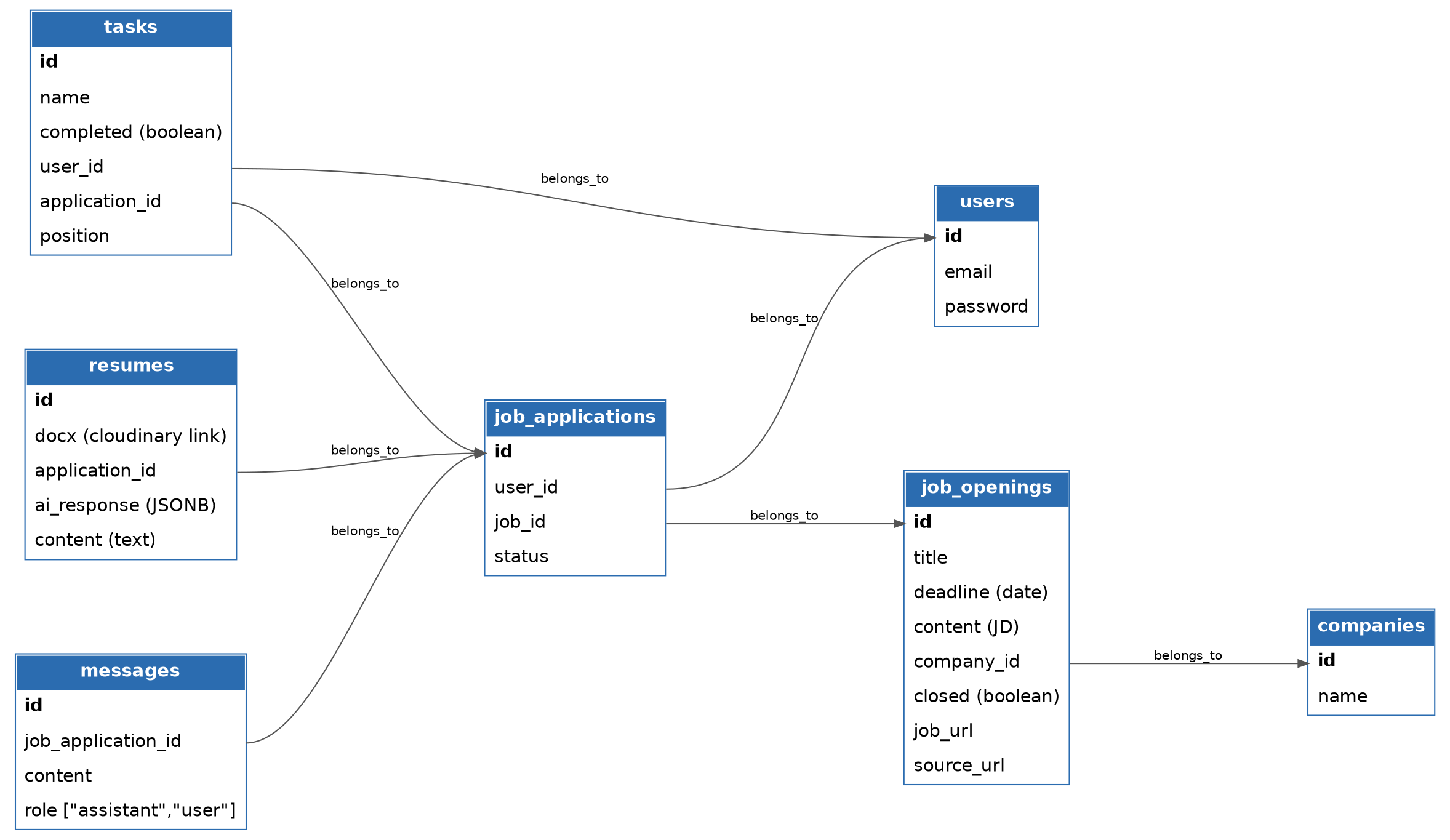
Key points:
- Users and job openings are related through a join table,
job_applications. A user has many job applications, and has many job openings through job applications. - Resumes and job applications have a 1:N relationship, hence the foreign key on the
resumestable. A user has many resumes through their job applications, while each resume belongs to one job application.
Technical challenges
OnlyOffice API integration
I tried many different options for integrating a text editor into the app. We settled on OnlyOffice because it has:
- An appealing UI
- Concurrent saving
- The ability to keep the indentation, bold text, and other styling choices in a CV

Here’s the flow:
- Upload resume.
The user uploads a
.docxdocument, which callsPOST /resumes.- The document is saved on the
Resumeinstance as an Active Storage (Cloudinary) file. extract_contentconverts the document into text and saves it ascontenton theResume.- A random callback token is created for this instance.
- Once complete, the user is redirected to the resume edit page (
GET /resumes/:id/edit).
- The document is saved on the
- Rails builds a signed editor config.
ResumesController#editbuilds a config hash for the OnlyOffice editor and signs it as a JWT. The config is rendered into the edit page, where the browser passes it toDocsAPI.DocEditor, which sends it to the OnlyOffice server. The JWT consists of:- Header: the HS256 algorithm
- Payload: a hash of the document URL (Cloudinary URL), document key, file type, callback URL, and user
- Signature: HS256 of the header and payload, computed with
ONLYOFFICE_JWT_SECRET
-
Browser mounts the editor. The view loads
api.jsfrom the OnlyOffice server as a script. - OnlyOffice fetches the file.
- The OnlyOffice server verifies the config’s JWT using the shared secret.
- It downloads the
.docxfrom the Cloudinary URL. - It converts the file and caches it under
document.key, which changes on every save.
-
User edits.
-
Closing the editor triggers a save. OnlyOffice builds a finished
.docxfrom the edits and sends a request to the callback URL withstatus: 2and a link to the finished file. - A background job stores the new version.
ResumeSaveJobdownloads the finished.docxand replaces the old file on Cloudinary with the new one.- It updates the resume’s
updated_at, which changesdocument.key, so the next editor session loads the new file.
Job board scraper
Three background jobs, triggered by a rake task. I schedule the task with Heroku Scheduler so it runs every day at 9 AM Japan time.

Here’s the flow:
-
Heroku Scheduler triggers
rails jobs:scrape. ScrapeJapandevJob- Sends a request to Japan Dev’s Meilisearch API, filtered to
juniorandnew_gradseniority. - For each listing, fetches the company’s jobs from the API to get the full job description and company info.
- Converts the HTML job description into plain text with Nokogiri.
- Sleeps 0.3 seconds between requests.
- Saves the results into an array of company and job opening hashes, which are then used to create
CompanyandJobOpeningrecords.
- Sends a request to Japan Dev’s Meilisearch API, filtered to
ScrapeCFNJob- Requests pages 1–12 of the company list API, filtered to categories that contain “IT”.
- For each job, calls the job API for the job description and salary. A regex finds any amounts ending in 円.
- Saves the results into an array of company and job opening hashes, which are then used to create
CompanyandJobOpeningrecords.
ScrapeWantedlyJob- Gets search result pages 1–5 for Ruby, Tokyo, and 未経験.
- Pulls the listing information out of the HTML with CSS selectors.
- Opens each job page to get the job description, company info, and salary.
- Saves the results into an array of company and job opening hashes, which are then used to create
CompanyandJobOpeningrecords.
RubyLLM schema for CV recommendations
On the resume edit page, the user clicks “Ask JobEasy for suggestions”, and Rails sends the resume text and the job description to OpenAI through RubyLLM. To get a structured answer, I store the response as JSONB, which is how I learned to use a RubyLLM schema (AiResponseSchema).
-
Get the resume text. As in the upload flow, the document is saved on the
Resumeas an Active Storage (Cloudinary) file, andextract_contentconverts it into text saved ascontent. -
User asks for suggestions. The button sends
POST /resumes/:id/recommendations. -
Define the response shape. The shape of the
ai_responseJSONB is defined up front:class AiResponseSchema < RubyLLM::Schema string :order_advice, description: "..." # where to place projects/experience string :summary_advice, description: "..." # how to write the top summary array :additional_advice, of: :string, description: "..." # up to 5 extra tips end -
Call the LLM. The
recommendationsaction inResumesControllercalls the LLM:chat = RubyLLM.chat.with_schema(AiResponseSchema) response = chat.ask("You are a professional tech recruiter ... #{@resume.content} ... #{job_opening.title} ... #{job_opening.content} ...") -
Read the structured result and save it.
-
Display the suggestions. Every piece of advice is rendered as a card. Clicking “×” sends
DELETE /resumes/:id/advices/:advice_id, which adds that advice’s id toai_response["dismissed"].
Final result
You can try the app at jobeasy.space.